FREE delivery & 40% Discount for next 3 orders! Place your 1st order in.
Shop Now
No products in the cart.
Add $ 300.00 to cart and get free shipping!
FREE delivery & 40% Discount for next 3 orders! Place your 1st order in.
Shop Now
No products in the cart.
Add $ 300.00 to cart and get free shipping!

Lowest price in the last 30 days: $71.15
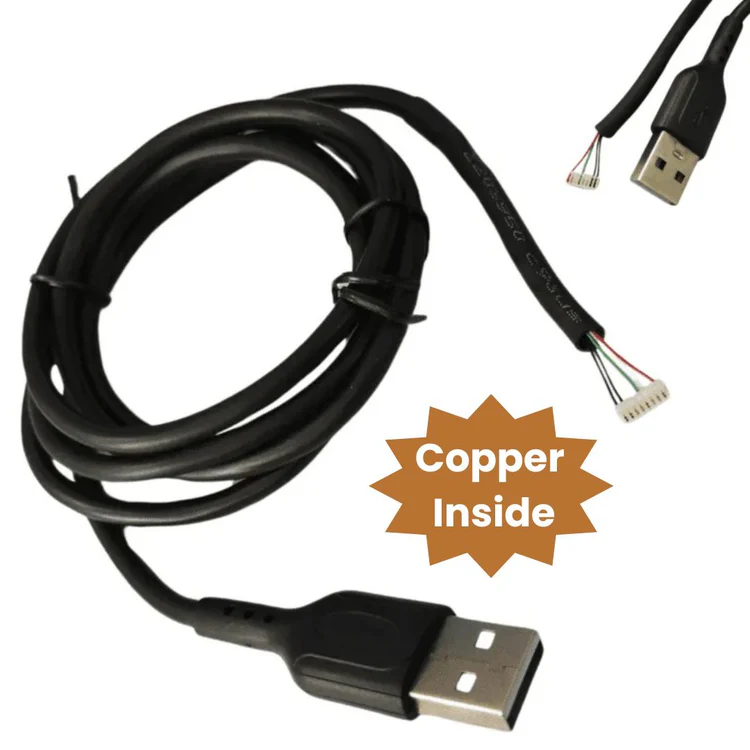
Premium USB Morpho Cable for MSO-1300, E1, E2, E3 Fingerprint Biometric Scanner

Superior-quality USB cable for Morpho biometric fingerprint scanners, offering enhanced durability and performance. This Fingerprint scanner cable / Biometric sensor cable / Scanner data cable / Attendance Machine Cable / Punching machine wire / FP scanner wire ensures consistent and accurate biometric authentication.
The Premium USB Morpho Cable for Biometric Fingerprint Scanner is a high-quality, reliable connectivity solution designed specifically for Morpho fingerprint devices such as Morpho MSO 1300 E3 and MSO 1300 E2. This durable USB cable ensures fast, stable, and secure data transfer, enabling smooth and accurate biometric authentication for Aadhaar verification, e-KYC, banking, and other identity-based services. Built with premium-grade materials, the cable offers excellent durability and a firm, snug connection to prevent disconnections during critical operations. Whether used in government offices, financial institutions, or mobile service points, this Morpho-compatible USB cable delivers consistent performance and long-lasting reliability. Its compact and portable design makes it easy to carry and ideal for professionals who require dependable biometric scanning on the go. Enhance your fingerprint scanner’s efficiency with this essential and cost-effective accessory.
Attribute
Details
Product Name
Premium USB Morpho Cable for Biometric Fingerprint Scanner
Compatible Model Nos.
Morpho MSO1300 E2, MSO1300 V3, MSO1350, MSO300, CBM Series, and other USB-based Morpho biometric fingerprint scanner models
Color
Black
Cable Type
USB 2.0
Length
Approximately 1 meter
Model No.
MORPHO-USB-CABLE
Ideal For
Biometric authentication, Aadhaar services, CSC centers, eKYC, and secure access systems using Morpho fingerprint devices
Installation
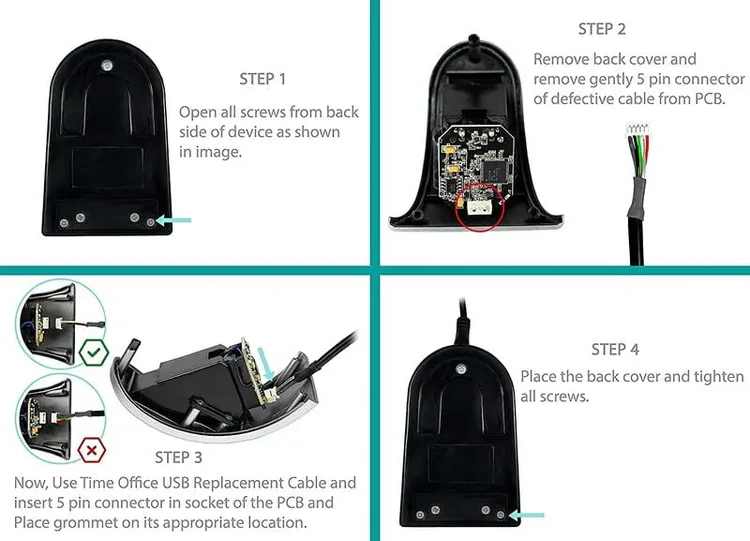
Plug USB into PC/laptop → Connect Mini USB to Morpho device → Ready for use





admin –
Sed perspiciatis unde omnis iste natus error sit voluptatem accusantium doloremque laudantium.
admin –
Sed perspiciatis unde omnis iste natus aliquam sit voluptatem exercitationem doloremque laudantium.